Ever wonder how Enterprise Access, Star, Ingres, Ingres Net, OpenROAD, and all the other offerings fit together?
Do you need to understand which drivers to use, how to interface and take advantage of Ingres within your solution?
This document is written based on a VIP presentation given by Bruce Lunsford, Architect, Ingres Engineering and gives an overview of how the various products work together and how to adapt the Ingres family of solutions to meet your needs:
-
Ingres Architecture Overview
-
Ingres/Net & GCF
-
Application Environments
-
Enterprise Access
-
EDBC
-
STAR
-
Replicator
-
OpenROAD Application Server
1. Ingres Architecture Overview
Client Server Architecture
The Ingres architecture is a client-server architecture.
Communication between the client (application) and the server (DBMS) is handled by the Ingres General Communications Facility (GCF). Underneath GCF, standard operating system protocols such as TCP/IP and named pipes are used to transfer messages between Ingres processes. Often there are multiple OS protocols supported and the user has the option to use any or all of the ones supported in his environment.
Ingres DBMS Process
The Ingres DBMS process, by default on most platforms, uses operating system threads to handle concurrent requests. Optionally, the Ingres DBMS may be configured to use Ingres internal threads which is an internal Ingres implementation of threads, but only then runs on one operating system thread. Ingres internal threads were used before OS thread capabilities were available on operating systems. In today’s environment, performance is generally better by using operating system threads, particularly on multi-CPU machines.
While functionally part of the DBMS, the recovery and archiver servers run as separate processes from the main DBMS process. They communicate with each other via shared memory.
Within an Ingres installation, multiple Ingres server processes (DBMS or Net) may be started up. This is configured as the start count in the configuration utility. Multiple processes may improve performance in a high-volume environment.
Installation ID
There may be multiple Ingres installations on a single machine; each must be identified by a unique 2-character installation id (default = II). This is often useful when requiring test and production, multiple releases of Ingres, different configurations, etc on the same machine.
2. GCF and Ingres Net
The General Communications Facility (GCF) provides communication capability between all the components of Ingres. It enables message passing between Ingres applications (front-ends) and servers (back-ends) on the same or different machines in a manner transparent to the caller.
GCF is often considered synonymous with Ingres/Net; however, technically speaking, Ingres/Net is only the GCC (General Communications Communications Server) sub-facility of GCF.
Consistent Messaging Interface
All clients and servers support a single messaging API called GCA (General Communications API).
GCA is used to pass requests from clients to servers and obtains responses from servers as network messages.
GCA (along with GCF) hides the following:
-
Location and system architecture of client from server
-
Location and system architecture of server from client
Code Example
call_status = gca_call( &gca_cb, GCA_RECEIVE,
(GCA_PARMLIST *)rvn_parms,
(i4) GCA_ASYNC_FLAG, /* Asynchronous */
(PTR)rvn_mde, /* async id */
(i4) -1, /* no timeout */
&status);
Functions and Characteristics
GCF is designed to transport SQL-oriented messages and, as such, is optimized for, but not restricted to, SQL traffic.
GCF internally takes care of machine differences between the client and the server machines such as integer and float formats and character sets. This allows the application and the DBMS to work with the messages in their local format and not care about the environment on the other end.
GCF also handles authentication of the user. For cross-machine connections, this is typically done by the Ingres name server in the DBMS installation by calling the operating system authentication routines with the userid and password. However, various authentication mechanisms are supported, including Kerberos. For Unix and Linux, the authentication may be customized for other security environments by modifying the ingvalidpw.c program.
GCN (General Communications Name Server) is the piece of GCF that routes application requests to the appropriate server. For example, if an application is connecting to a local (same installation) DBMS, the connection request is routed directly to the local DBMS server. If connecting to a DBMS in a different Ingres installation (typically a different machine), then GCN directs the connection request to the local GCC, which will then connect across the network to the remote installation.
When more than 1 DBMS process is running in an Ingres installation, the name server will do simple load balancing of the sessions. The name server keeps an approximate count of the number of sessions running in each DBMS process. It does this by doing a periodic (default=5 minutes) bedcheck of each server process and receiving an exact count of the number of sessions currently active. Each time a new connection request comes in, the name server sends it to the DBMS with the lowest session count and increments his session count for that DBMS process. When sessions disconnect, the name server is not notified, so his count will be inaccurate until the next bedcheck. NOTE that the amount of activity on each session is not taken into account, only the number of active connections.
GCF provides for both synchronous and asynchronous calls.
The network protocols supported are TCP/IP (all platforms) and (dependent on platform) named pipes, SNA LU62, DECNET and others. NOTE that these can be running concurrently in GCC processes.
Architecture (GCA, GCC, GCN, etc)
Primary Components:
-
GCA – Application Program Interface
-
GCB – Communication Bridge
-
GCC – Communication Server (aka, Ingres/Net)
-
GCD – Data Access Server
-
GCN – Name Server
-
GC – Compatibility Library routines – local IPC and network protocol drivers (TCP/IP, DECNET, etc)
-
GC* - other internal components

Note:
Registration of server ports to GCN are done once at startup of each process … (see dash/dotted red line) and then bedchecked periodically to make sure still running and get load balance info.
The application is invoked with an Ingres connection string of the format [vnode::]dbname[/dbtype].
Some examples for the Ingres Terminal Monitor (sql):
|
sql testdb |
connect to local Ingres database called “testdb” |
|
sql hostb::testdb |
connect to remote Ingres database called “testdb” using the definition of vnode “hostdb” to locate/identify the remote Ingres installation |
|
sql testdb/oracle |
connect to local Ingres Enterprise Access (EA) to Oracle aliased as database name “testdb” |
The application connection request (with the connection string) ALWAYS goes directly to the local Ingres name server (GCN) first.
The name server is aware of all servers (such as GCC and DBMS) running in that Ingres installation because each server process registers with GCN when they start up.
GCN parses the connection string. If it contains a vnode, then it looks up the vnode in it’s vnode database and passes back the information for the remote Ingres installation and also the communications port of the local GCC. If the connection string does not contain a vnode, then the GCN passes back the communications port of the local DBMS.
Once the application receives this information back from GCN, it disconnects from GCN and then connects to the provided communications port and passes along relevant information. In the case of the DBMS, he just needs to know the name of the database to be accessed. In the case of GCC, he needs to know the remote hostname, port (numeric or mnemonic) of the remote Ingres GCC, network protocol, and the remote database name. GCC will then connect to a remote GCC who will act of behalf of the application and go through a similar process on the server installation to get the application connected to the right database. NOTE that the vnode database is maintained by the DBA (or sometimes by the end user) on the client machine using the Ingres Network Utility.
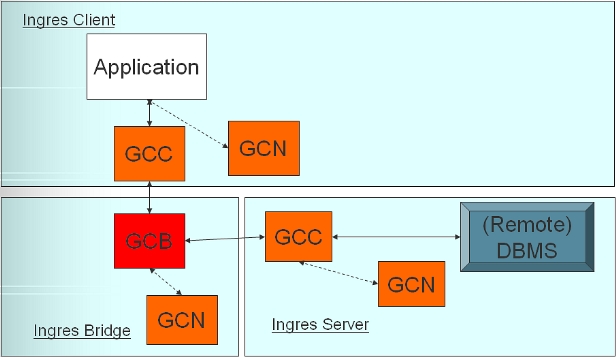
Bridge is rarely used.
It enables communication across different network protocols. Originally intended for SNA access to mainframe from Ingres clients that had no SNA connectivity. Client would communicate to bridge over TCP/IP and bridge would communicate to mainframe over SNA. Similar could be done for TCP/IP and DECNET. As TCP/IP became standard on all machines, the bridge became unnecessary.
Another possible use would be in a firewall environment to further isolate the client from the server. One customer uses it to make it easier to reconfigure Ingres server locations; the client vnodes stay the same and only the vnodes on the intermediate Ingres Bridge need to be changed.
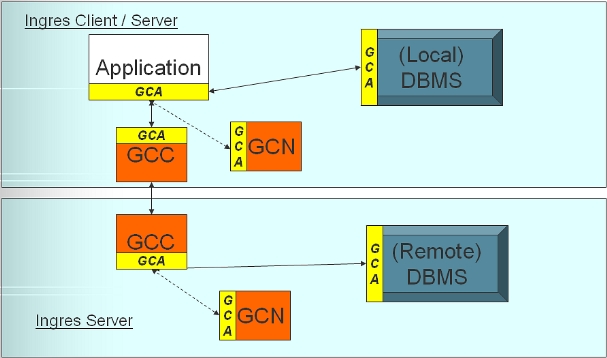
Note that GCA is the “common” application program interface (API) for all of the components.
GCC to GCC does NOT use GCA; it uses an OSI model. GCA is a client-server protocol. GCC acts like the server to the application on the client side; on the remote server machine, GCC acts as the client to the DBMS server (on behalf of the application).

While this slide is complex and can be intimidating at first glance, its primary purpose is to show how GCA is the common API interface for all parts of Ingres, regardless of the type of language or server. The GCA CL is the operating system specific layer that handles network communications (TCP/IP, named pipes, etc).
Focusing on the application portion of this slide (upper left), you can see that applications (and the GCD server) do not call GCA directly. Instead, they call one of the 2 standard application interfaces provided by Ingres:
-
OpenAPI – C callable function interface
-
LIBQ – embedded SQL interface
Most servers on the other hand do call GCA directly.
“CL” stands for Compatibility Library in Ingres. CL is where operating system functions are called from. Note that there is a GCC CL and a GCA CL which both contain protocol drivers for network and local communications respectively. In some cases, these routines are shared. For instance, on Unix and Linux, TCP/IP is the default local and network protocol and shares, for the most part, the same code.
NOTE that JDBC and .Net are handled a bit differently. The JDBC driver (iijdbc.jar and the older edbc.jar) and the .Net Data Provider communicate over a non-GCA protocol to GCD using TCP/IP. GCD then calls OpenAPI to convert this to GCA and, from that point on, looks like any other application to the rest of the system.

It doesn’t really matter what language the application is written in. It will still go through the same architecture. The DBMS server is unaware of what type of application it is communicating with. Even the open source language drivers go through the same components. For instance, the current Ingres Perl driver is written in Embedded SQL and hence goes through the LIBQ interface. ODBC is written with the OpenAPI interface. The Python driver is written using Ingres ODBC. The PHP driver, on the other hand, is written with OpenAPI.
The other point emphasized on this slide is that .Net and JDBC applications can either connect locally via the JDBC/.Net drivers to GCD, which must then communicate via Ingres/Net to the remote DBMS. Or, the applications can just as easily connect directly to the GCD running in the DBMS installation and skip the intermediate GCC layers, which usually provides better performance due to the reduced number of layers of code, process switches, and message transfers.
3. Application Environments
Open Application Program Interface (OpenAPI)
OpenAPI is a C language call-level interface for access to the Ingres DBMS server, Enterprise Access, or EDBC databases. It contains support for native operating system threads; ie, it is “threadsafe”.
OpenAPI provides an alternative to Embedded SQL or Ingres ODBC with additional capabilities for asynchronous processing. It provides both asynchronous or synchronous calls capability (asynchronous calls use call back functions). It supports multithreaded applications with asynchronous calls and operating system thread support, which is useful for application servers and windowing applications.
OpenAPI is also used internally within Ingres, such as in ODBC, Data Access Server, and Replicator.
ODBC
ODBC is a Microsoft industry standard for SQL database-independent access.
Primary Uses of ODBC
-
Windows-centric applications
-
Simple, ad hoc Visual Basic applications
-
Web-based ASP systems
-
Industry-standard interface (C language functions)
-
Other drivers often have bridge to ODBC (JDBC-ODBC, OLE/DB-ODBC, PHP-ODBC, etc)
ODBC Driver Architecture

The Application connects to the Driver Manager, which connects to the ODBC Driver, which connects to the Database server with Ingres OpenAPI and, if the DBMS is located on another machine, connecting through Ingres/Net.
ODBC on Unix/Linux
Starting with ODBC version 3.5, the driver is available for Unix/Linux platforms as well.
It supports the Ingres ODBC driver manager and the unixODBC driver manager.
The Ingres ODBC driver manager was added in Ingres 2006 to eliminate the need to download and use a 3rd-party driver manager. It provides a forms-based administrative tool for ease of use and to reduce configuration errors.
The Unix/Linux ODBC driver uses the same code and, therefore, provides the same functionality as the Windows version. The operating system differences are hidden in the Ingres CL layer.
There may also be some differences due to the ODBC driver managers themselves. For instance, the Ingres ODBC driver manager (and even the unixODBC one) do not have all of the functionality of the Microsoft ODBC manager on Windows. However, it is unusual that applications will notice any differences.
JDBC
JDBC is the Java database-independent standard for SQL access to relational databases. It is a call-level Java API used directly by Java applications, all J2EE servers and Java tools. Higher level Java data abstraction interfaces (Hibernate, Torque, etc.) all filter down eventually to the JDBC interface.
“iijdbc.jar” is the file name of the current Ingres JDBC driver, which is JDBC 3.0 compliant. “edbc.jar” is the file name of the driver in Ingres 2.5, 2.6 and EDBC 1.1 which is JDBC 2.0 compliant. The edbc.jar JDBC driver is provided in some of the Ingres r3 and 2006 releases for backward compliance and may be used against the later DAS (GCD) servers. The reverse is not supported: iijdbc.jar to Ingres 2.6 or earlier JDBC servers. Customers should migrate off of the edbc.jar driver as soon as they have the opportunity as no future enhancements are going into that driver and it will eventually become obsolete.
Because the Ingres JDBC driver is a type 4, it can be deployed by itself into any Java environment without installing any other Ingres components on that machine. In other words, just copy the driver file to the appropriate target directory.
.NET & the Ingres .NET Data Provider
What is .NET?
-
Simplified programming model
-
More robust
-
Components bound to version (End of “DLL Hell”)
-
Common Language Runtime
-
Type system
-
Microsoft intermediate language
-
Compile once — run anywhere
.Net is Microsoft’s new standard and architecture for application development. It was designed to address a lot of the problems that had plagued application development and deployment on Windows in the past. See Microsoft website for more information.
Common Language Runtime
-
Replaces COM plumbing
-
Self-describing components
-
Stack-based Intermediate Language (MSIL)
-
Execution engine
-
Common type system
-
All chars and strings are Unicode
Compilers / Languages
-
Compilers (C#, J#, VB.NET, C, C++)
-
Languages
-
Microsoft (C#, J#, VB.NET, ASP.NET, C++, Jscript)
-
Third party (Cobol, Fortran, Perl, Pascal, Python, Smalltalk and so on)
With the CLR (Common Langauge Runtime) in .NET, all of the .NET languages can interoperate seamlessly and run in the same environment.
Ingres .Net Data Provider
-
Ingres r3 (.NET 1.1 / VS 2003)
-
Ingres 2006 r2 (.NET 2.0 / VS 2005)
-
2.0 is database independent
-
Tighter integration with VS
-
Written in C#
-
Modelled after Ingres JDBC driver:
-
No Ingres client required
-
Accesses Ingres Data Access Server (DAS)
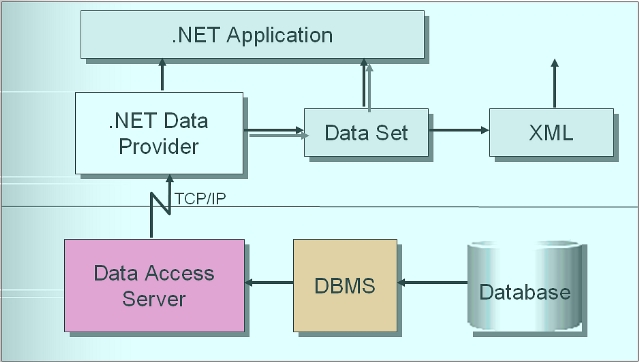
Typically, a .Net application will download data via the Ingres .Net Data Provider into a “data set”. At that point, Microsoft provides various .Net classes to process the data set, such as converting it to XML.
Popular Industry-Standard Languages
-
3 Ps => Perl, PHP, Python
-
Ruby
-
Written on top of:
-
ESQL/C
-
OpenAPI
-
ODBC
-
More portable to/from other DBMS’s than OpenAPI
-
More engineers familiar with ODBC than OpenAPI
-
An ODBC-based driver often comes with a language
The underlying interface is not really important to the users of these language drivers. However, it demonstrates the flexibility in writing language drivers in Ingres. One situation where it does matter is with respect to turning on tracing; ESQL/C has different tracing options than OpenAPI.
It should also be noted that all of these language drivers require an Ingres client (minimum) to be installed on the application machine.
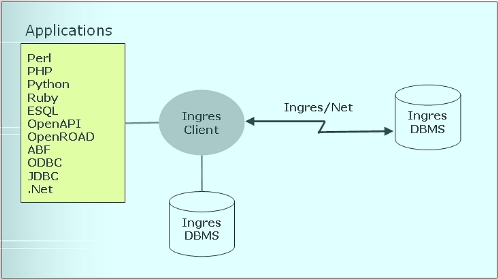
All languages go through the same infrastructure starting with the GCA layer and need not be aware of the location or type of the Ingres DBMS.
Likewise, the reverse is also true. The DBMS is unaware of the type of language being used and whether the application is running locally or remotely.